

For many agent use cases, that is enough. It stops being enough when the answer depends on what things are and how they relate: which product a code refers to, which procedure applies to which batch, which version of a document is in force.
Newton Core is the scinr SDK, an open source Python library: pip install scinr, documentation at scinr-ai.github.io/scinr. This post covers the design choice behind it, what it looks like in code, and what Newton Core does not include.
Where the usual routes stop
Generic AI memory tools store what an agent sees and retrieve it later. They are quick to adopt, and they do not know your domain. A product code and a dosage procedure are both text to retrieve.
The other route is a graph database. A graph can hold exactly the structure your domain needs, and Neo4j is a good example. But a precision knowledge layer built directly on it means designing the graph model yourself: node types, identities, relationships, and the pipeline that fills them. That takes graph modeling expertise.
Newton Core takes a third route. You describe your domain as Pydantic models, in Python. You declare identity and relationships as field metadata. The SDK creates the graph schema, extracts against your models and writes the knowledge graph to Neo4j. You still make the modeling decisions. You do not write the graph plumbing.
You define the schema
Domain models are Pydantic classes, grouped into themes. A theme is a folder with an __init__.py, a catalog.py and a models.py:
my_themes/
  my_theme/
    __init__.py
    catalog.py      # exports THEME_DESCRIPTION and SELECTABLE_MODELS
    models.py       # your Pydantic models
The catalog describes the theme and lists the models the pipeline can choose from. You point the SDK at the parent folder with extra_models_paths, and it discovers the theme from there.
Graph behavior comes from metadata on the fields, not from pipeline code:
entity_labelmarks stable identifiers, such as codes and substance names. They become entities shared across documents.instance_keymarks what makes a record unique.field_relationshipsandinstance_relationshipsdeclare the links between entities and between records.
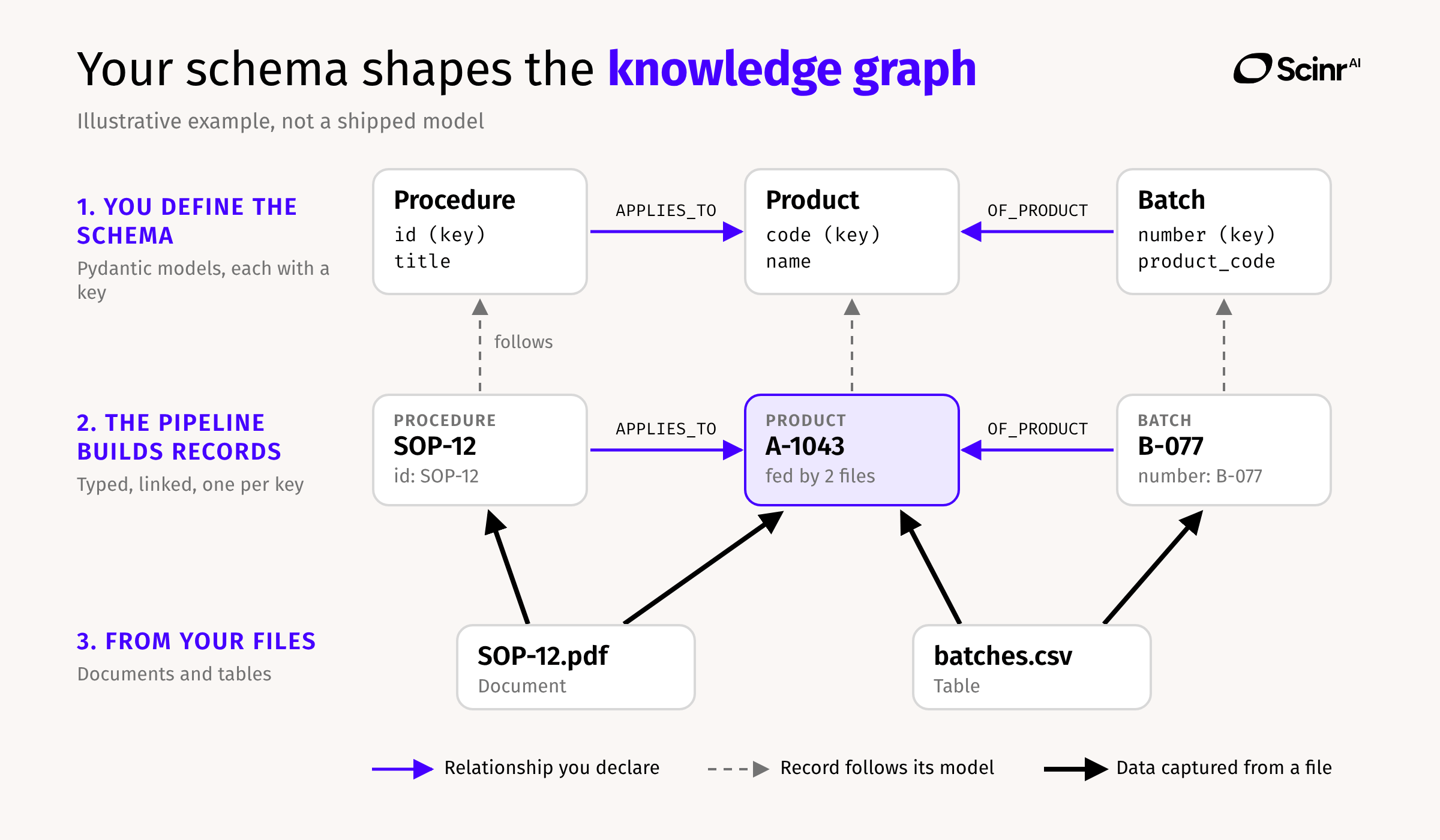
The output has a shape you chose: typed records with fields you can query, instead of passages you have to read again.
One thing to be clear about. The only open source theme is a generic triple model, used when nothing more specific matches. With Newton Core you bring your own domain models. The built-in library of life sciences domain models, based on standards such as IDMP and RxNorm, is part of Newton Cloud, which is in beta.
What the graph gives you
Shared entities. Entities you label are deduplicated across documents within a tenant, by their normalized value. The same substance in two documents is one node. Deduplication follows the fields you label and the keys you declare. It is not automatic semantic matching.
Links across documents. Relationships you declare can connect records across sections and across documents.
Versions. A new version of a document is linked to the previous one, or you can update the latest version in place.
Provenance. Every ingested document carries the tenant, user and job that created it. You can delete a whole ingestion run by job ID.
Five stages, one pipeline
Documents go through five stages. Each stage can run on its own, or you can run the whole pipeline:
StageWhat it doesPreprocessConverts raw files to paged markdownExtractBuilds a document tree from the pages, using an LLMIngestWrites the tree to Neo4j as nodes and relationshipsAnnotateAssigns extraction models to the document structureEntity extractionPulls typed entities out of the text against those models
Tabular files (CSV, XLSX and XLS) have a separate pipeline: LLM entity extraction followed by normalization. Newton Core reads PDF, DOCX, XLSX, XLS and CSV today. More formats are planned.
Documents and tables end up in the same knowledge base. What connects them is the models you define, not an automatic join. If a table row and a paragraph describe the same product, it is the model that gives them a common shape.
The quickstart, adapted from the documentation:
import asyncio

from langchain_openai import ChatOpenAI
from scinr.newton import configure, run_pipeline


async def main():
    configure(
        llm=ChatOpenAI(model="gpt-4o"),
        neo4j_uri="bolt://localhost:7687",
        neo4j_user="neo4j",
        neo4j_password="your-password",
        neo4j_database="neo4j",
        mistral_api_key="your-mistral-key",  # needed to process PDFs
    )

    result = await run_pipeline(input_raw="./raw_docs")
    print(f"Success: {result.success}")
    print(f"Stages executed: {result.stages_executed}")


asyncio.run(main())
The graph and the originals, together
Newton Core writes the knowledge graph to Neo4j. MongoDB is optional. When you configure the document store, the original files and pages are kept alongside the knowledge. In Newton Core it is optional and recommended.
That is what makes traceability practical. Every record can be traced to its source, and with the originals stored next to the graph, a reviewer can go from a record back to the file it came from.
Neo4j 5.x or later is required for the graph today. Support for other databases, such as PostgreSQL with Apache AGE, is on the roadmap. We do not give dates.
Built to be operated
A pipeline that runs once on a folder is a demo. Newton Core includes the parts you need to keep one running:
Tenants. Multi-tenancy by tenant ID.
Document lifecycle. You can delete, freeze and restore documents. Restoring a frozen document makes no LLM calls, so bringing an archived document back does not trigger another round of extraction.
Progress. Live progress, stage by stage and document by document, through callbacks.
Malformed output. An automatic repair loop fixes malformed LLM output during extraction. It is a repair loop, not a guarantee of correctness: review what matters.
Your model, your choice
Newton Core works with any LangChain-compatible chat model. The README shows OpenAI, AWS Bedrock, Ollama and Anthropic. Install the extra for your provider, for example pip install 'scinr[openai]', and pass the model to configure().
To read the graph back, Newton Core includes a read-only, asynchronous Python API to navigate it. It is a Python API, not a REST API.
What you need, and what is not in Newton Core
What you need:
Python 3.11 or later
Neo4j 5.x or later, running and reachable
A LangChain-compatible chat model
A Mistral API key to process PDFs
On PDFs: the built-in PDF converter uses the Mistral OCR API, a third-party service, and we recommend it. It gives good results at an effective cost. You can register your own converter if you prefer another route. If you never ingest PDFs, you do not need the key.
What is not in Newton Core: a REST API, an MCP server, OAuth 2.0, OIDC and SSO, the built-in library of sector domain models, and connectors to enterprise systems. Those are Newton Cloud features.
Newton Cloud is our commercial platform, in beta. It includes everything in Newton Core, plus agent-ready API and MCP integrations, OAuth 2.0, OIDC and SSO, and the built-in life sciences domain model library. If you want to start from the SDK and see where the design takes you, Newton Core is the place.
Try it
pip install scinrDocumentation: scinr-ai.github.io/scinr